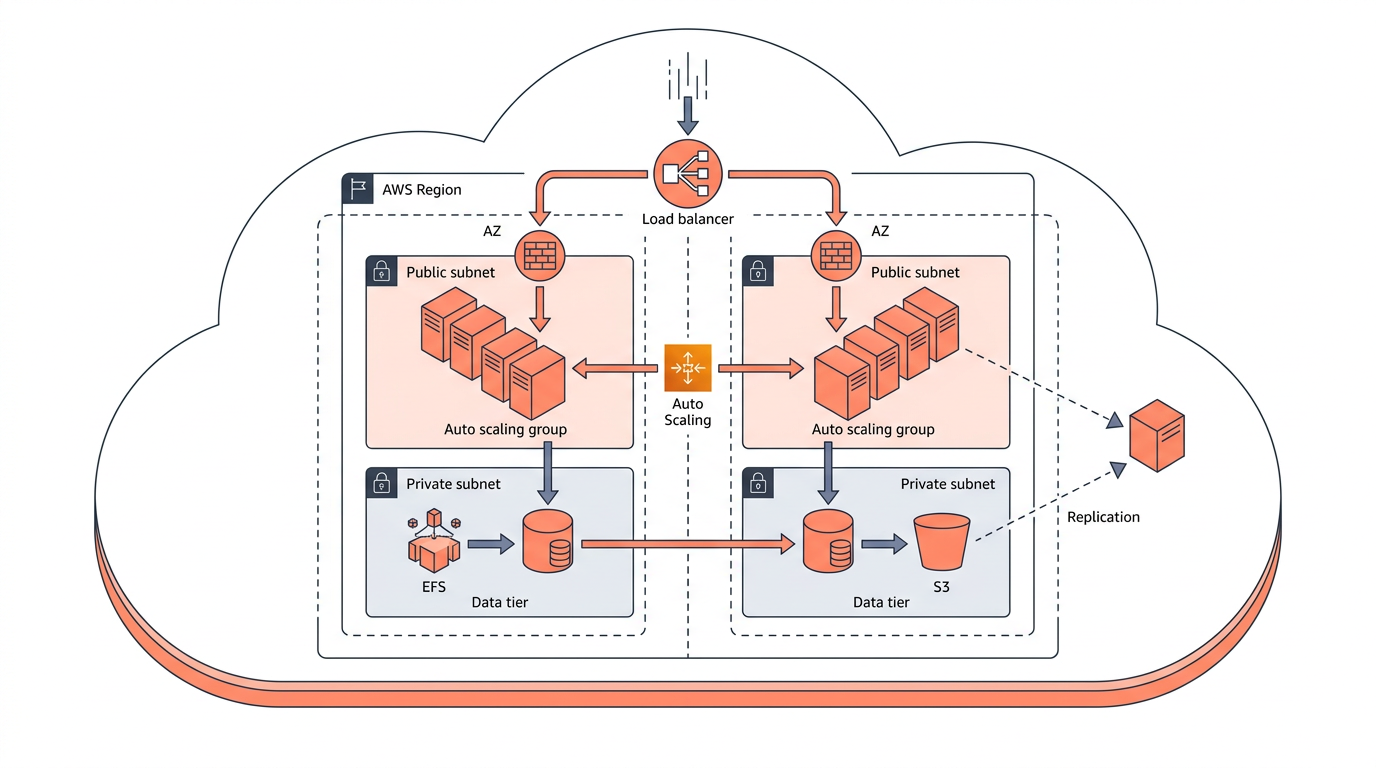
High availability on AWS means designing systems that remain operational despite hardware failures, network disruptions, or entire data-center outages — typically targeting 99.9% uptime or better. Achieving that goal requires deliberate choices across compute, networking, storage, and data tiers. In this article you will learn how multi-AZ architecture, multi-region deployments, load balancing, and Auto Scaling work together, and how to make honest trade-offs between recovery objectives and cost.
AWS publishes its Well-Architected Framework Reliability Pillar as the canonical reference for these patterns. The guidance has evolved significantly since 2023, but the core principle remains unchanged: eliminate every single point of failure before it eliminates your availability.
What "High Availability" Actually Means in AWS Terms
High availability (HA) is not a binary state — it is a spectrum measured by Recovery Time Objective (RTO) and Recovery Point Objective (RPO). RTO is the maximum tolerable downtime after a failure; RPO is the maximum tolerable data loss measured in time. A system with a 1-minute RTO and a 0-second RPO is far more expensive to build than one with a 4-hour RTO and a 1-hour RPO, and both may be called "highly available" depending on the business context.
AWS Availability Zones (AZs) are physically separate data centers within a region, connected by low-latency, high-bandwidth fiber. Each AZ has independent power, cooling, and networking. Distributing workloads across at least two — ideally three — AZs is the foundational move for fault tolerance on AWS.
Multi-AZ Architecture: The Foundation
Deploying across multiple Availability Zones is the minimum viable HA pattern on AWS; it protects against the most common failure modes without the complexity of cross-region replication.
Compute
Place Amazon EC2 instances or Amazon ECS/EKS tasks in at least two AZs. Use an Application Load Balancer (ALB) or Network Load Balancer (NLB) in front of them — both services are themselves multi-AZ by default and distribute traffic only to healthy targets. The ALB operates at Layer 7 (HTTP/HTTPS, ports 80 and 443) and supports path-based and host-based routing. The NLB operates at Layer 4 (TCP/UDP/TLS) and is preferred when you need ultra-low latency or static IP addresses.
Databases
Amazon RDS Multi-AZ maintains a synchronous standby replica in a second AZ. Failover is automatic and typically completes in 60–120 seconds, which directly maps to your RTO floor for database-tier failures. Amazon Aurora goes further: it replicates data six ways across three AZs by default, and Aurora Global Database can replicate to a secondary region with a typical lag under one second.
For Amazon DynamoDB, multi-AZ durability is built in — you do not configure it separately. DynamoDB Global Tables extend this to multi-region active-active replication.
Storage and Caching
Amazon S3 stores objects redundantly across a minimum of three AZs within a region (Standard storage class). Amazon ElastiCache supports cluster mode with replicas spread across AZs. Amazon EFS is inherently multi-AZ for Regional file systems.
Multi-Region Architecture: When Multi-AZ Is Not Enough
Multi-region deployments protect against region-wide events — rare but real — and are required when RTO/RPO targets are measured in seconds rather than minutes.
A full region outage is uncommon, but regulatory requirements, data sovereignty rules, or aggressive SLAs sometimes mandate geographic redundancy regardless. The trade-off is significant: cross-region architectures add latency, replication cost, and operational complexity.
Common Multi-Region Patterns
- Pilot Light: A minimal version of the environment runs in a secondary region. Core data is replicated continuously, but compute is scaled to near-zero. On failover, you scale up. RTO: 10–30 minutes.
- Warm Standby: A scaled-down but fully functional copy runs in the secondary region. RTO: 1–5 minutes.
- Active-Active (Multi-Site): Traffic is served from multiple regions simultaneously via Amazon Route 53 latency-based or geolocation routing. RTO approaches zero; RPO is near-zero with synchronous replication. Cost is roughly 2× a single-region deployment.
AWS Route 53 Application Recovery Controller (ARC) — available since 2022 — provides readiness checks and routing controls that let you shift traffic between regions or AZs in a controlled, audited way, reducing the risk of a botched failover making things worse.
Load Balancing: Distributing Traffic and Absorbing Failures
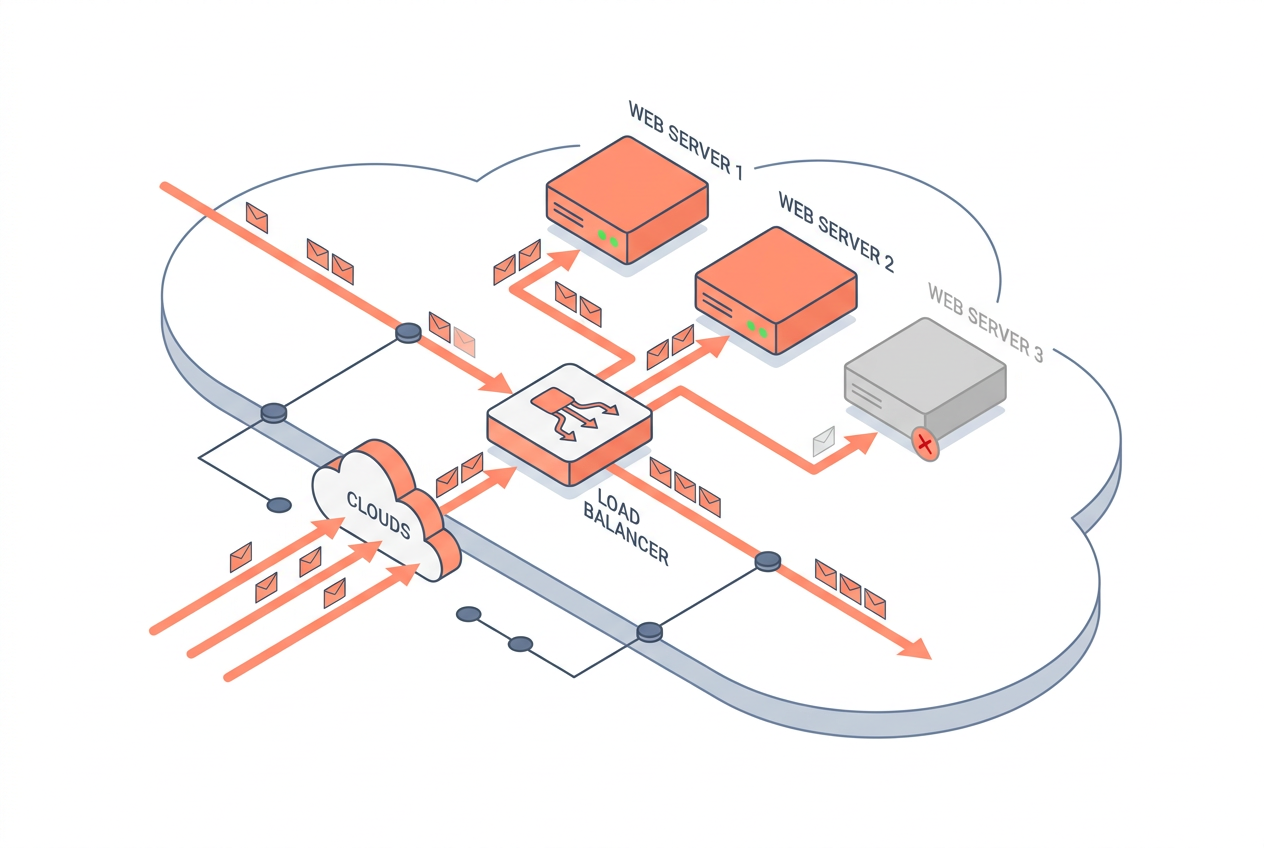
AWS load balancers are the traffic-management layer that makes multi-AZ and multi-region architectures transparent to clients.
| Load Balancer | OSI Layer | Key Protocols | Best Use Case | Cross-Zone Default |
|---|---|---|---|---|
| Application LB (ALB) | 7 | HTTP, HTTPS, gRPC | Web apps, microservices | Enabled |
| Network LB (NLB) | 4 | TCP, UDP, TLS | Low-latency, static IP | Disabled (configurable) |
| Gateway LB (GWLB) | 3 | GENEVE (port 6081) | Inline security appliances | N/A |
| Classic LB (CLB) | 4/7 | HTTP, HTTPS, TCP | Legacy workloads only | Disabled |
Cross-zone load balancing is worth calling out explicitly. When enabled on an ALB (the default), the load balancer distributes requests evenly across all registered targets in all enabled AZs, not just the targets in its own AZ. This prevents hot-spotting when AZs have unequal instance counts — a common scenario during rolling deployments.
Health checks are the mechanism that makes load balancing fault-tolerant. Configure them conservatively: a 5-second interval with a 2-failure threshold means a target is removed from rotation within 10 seconds of becoming unhealthy. Overly generous thresholds let bad instances serve traffic for too long.
Auto Scaling: Elastic Capacity for Availability and Cost
AWS Auto Scaling ensures that the right number of healthy compute resources are running at all times, automatically replacing failed instances and scaling out under load.
EC2 Auto Scaling Groups
An Auto Scaling Group (ASG) spans multiple AZs. When an instance fails its EC2 status check or the load balancer health check, the ASG terminates it and launches a replacement in the healthiest AZ. This self-healing behavior is the primary HA benefit of ASGs, independent of any scaling policy.
Scaling policies come in three flavors:
- Target Tracking: Maintain a metric (e.g., CPU at 60%). Simplest to configure; recommended as the default.
- Step Scaling: Add or remove capacity in steps based on CloudWatch alarm thresholds.
- Scheduled Scaling: Pre-warm capacity before known traffic spikes (e.g., a marketing campaign launch).
Predictive Scaling uses machine learning to forecast demand and scale proactively. It has been generally available since 2021 and works well for workloads with recurring daily or weekly patterns.
Capacity and Limits
ASGs support up to 2,500 instances per group (as of 2026). For containerized workloads, ECS Service Auto Scaling and EKS Cluster Autoscaler (or Karpenter, the preferred option for EKS since 2024) provide equivalent behavior at the task/pod level.
RTO/RPO Trade-offs: Choosing the Right HA Tier
The right availability architecture is the one that matches your business's actual recovery objectives — not the most sophisticated one you can build.
| Strategy | Typical RTO | Typical RPO | Relative Cost | Complexity |
|---|---|---|---|---|
| Single-AZ (no HA) | Hours | Hours | 1× | Low |
| Multi-AZ (same region) | Minutes | Seconds | 1.3–1.5× | Medium |
| Pilot Light (multi-region) | 10–30 min | Minutes | 1.5–2× | High |
| Warm Standby (multi-region) | 1–5 min | Seconds | 2–2.5× | High |
| Active-Active (multi-region) | Near-zero | Near-zero | 2.5–3× | Very High |
Cost multipliers are illustrative estimates based on common workload patterns; actual costs depend heavily on data transfer, replication, and instance types chosen.
A practical approach: start with multi-AZ for all stateful services, use Route 53 health checks and failover routing to a static S3 error page as a minimum "circuit breaker," and only invest in multi-region infrastructure when your RTO/RPO requirements — validated with the business — genuinely demand it.
Key Takeaways
- Multi-AZ is the baseline: Deploy compute, databases, and caches across at least two AZs to eliminate single-AZ failure as a risk.
- RTO and RPO drive architecture: Define these numbers with the business before choosing a pattern; they determine cost and complexity.
- Load balancers are not optional: ALBs and NLBs provide health-check-driven traffic routing that makes AZ failures invisible to clients.
- Auto Scaling provides self-healing: ASGs automatically replace failed instances, making them essential even when you are not scaling for load.
- Multi-region is expensive and complex: Reserve active-active or warm-standby multi-region designs for workloads with sub-minute RTO requirements or regulatory mandates.
- Route 53 ARC reduces failover risk: Use readiness checks before executing a regional failover to avoid trading one outage for another.
- Test your recovery paths: An untested failover procedure is not a recovery procedure. Run Game Days and use AWS Fault Injection Service (FIS) to validate assumptions.
Frequently Asked Questions
What is the difference between high availability and fault tolerance on AWS?
High availability means a system can recover quickly from failures, typically with brief downtime measured in seconds or minutes. Fault tolerance means the system continues operating without any interruption even when a component fails — a stricter and more expensive standard. Multi-AZ RDS with automatic failover is highly available; an Aurora cluster serving reads from multiple replicas simultaneously is closer to fault-tolerant.
How many Availability Zones should I use?
Three AZs is the recommended minimum for production workloads. Using three AZs means that if one AZ fails, the remaining two each absorb roughly 50% more traffic — a manageable increase. With only two AZs, a failure doubles the load on the survivor, which can trigger a cascading failure if capacity is tight.
Does multi-AZ deployment double my AWS bill?
Not exactly. Compute costs roughly double if you run equal capacity in each AZ, but managed services like RDS Multi-AZ add approximately 2× the storage cost and a standby instance, not a full second read/write database. Data transfer between AZs within the same region is charged at $0.01 per GB (as of 2026), which is usually a small fraction of total cost.
What is the fastest RTO achievable on AWS?
Active-active multi-region architectures with Route 53 health checks can achieve RTOs measured in seconds — effectively the time for DNS TTL expiry and client reconnection. For single-region workloads, Aurora's automatic failover typically completes in under 30 seconds, and ALB health checks can route around a failed target in under 10 seconds.
When should I use an NLB instead of an ALB?
Use an NLB when you need static Elastic IP addresses (useful for whitelisting), sub-millisecond latency, or protocols other than HTTP/HTTPS (such as raw TCP or UDP). Use an ALB for web applications, microservices with path-based routing, WebSocket support, or gRPC — the ALB's Layer 7 awareness enables richer routing and observability.
How does AWS Auto Scaling interact with Availability Zones during a failure?
When an AZ becomes impaired, the Auto Scaling Group detects that instances in that AZ are unhealthy and launches replacement instances in the remaining healthy AZs. This is called AZ rebalancing. Once the impaired AZ recovers, the ASG gradually rebalances instances back across all AZs to maintain even distribution.
Is Amazon DynamoDB automatically highly available?
Yes. DynamoDB replicates data synchronously across three AZs within a region for every table, and this behavior is not configurable — it is always on. For multi-region active-active requirements, DynamoDB Global Tables extend replication to up to 20 regions with last-writer-wins conflict resolution and sub-second replication lag under normal conditions.
Draw this in seconds with draft1. Describe your architecture in plain English and draft1 generates an editable AWS/cloud diagram plus documentation — no dragging boxes around. Try it free.