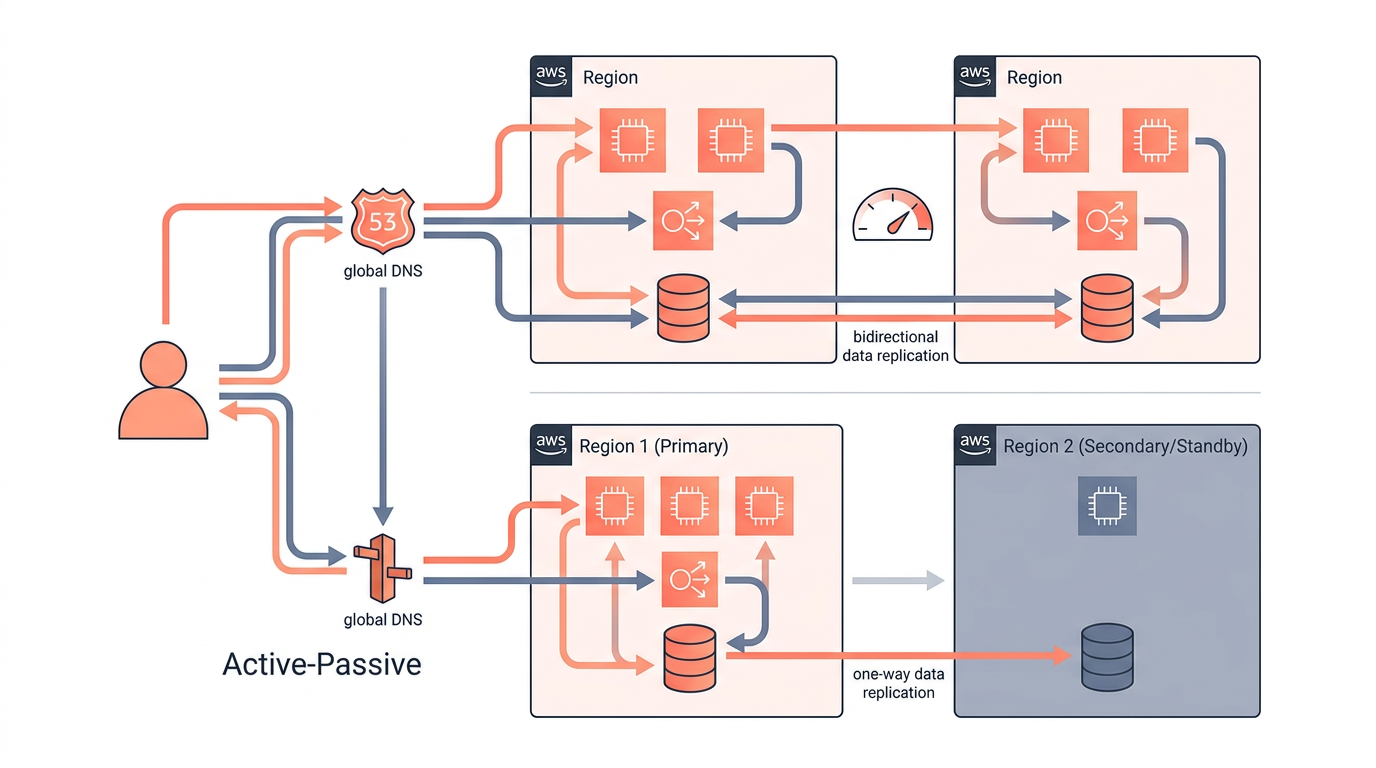
Multi-region AWS architecture means running your workload across two or more AWS regions simultaneously, giving you geographic redundancy, lower latency, and protection against region-level failures. Choosing between active-active and active-passive is the single most consequential design decision you will make, because it shapes your data replication strategy, your Route 53 configuration, your RTO/RPO targets, and your monthly bill. This article breaks down both patterns with concrete AWS service choices, real trade-offs, and a side-by-side comparison table so you can make an informed decision.
Whether you are designing a greenfield SaaS platform or hardening an existing workload for disaster recovery on AWS, the guidance here applies to engineers who need specifics — not marketing platitudes about "five nines."
What Is Active-Active Multi-Region Architecture?
Active-active means every region in your topology simultaneously serves live production traffic, reads, and writes. There is no standby; every node is hot. If one region fails, Route 53 health checks detect the failure and shift traffic to the surviving regions within seconds — no manual intervention required.
How it works on AWS
- Amazon Route 53 is configured with Latency-Based Routing or Weighted Routing policies. Each region has an A/AAAA record pointing to a regional load balancer (typically an Application Load Balancer or an Amazon CloudFront distribution). Health checks are attached to each record; an unhealthy endpoint is automatically removed from DNS responses.
- Compute runs on Amazon ECS, Amazon EKS, or EC2 Auto Scaling Groups in each region, sized to handle 100 % of traffic alone (or at least a defined fraction if you are using weighted routing).
- Data replication is the hard part. Because writes can land in any region, you need a database that supports multi-master replication. AWS-native options include:
- Amazon Aurora Global Database — up to five secondary regions, sub-second replication lag, and the ability to promote a secondary to primary in under a minute. Aurora Global Database supports write forwarding, which lets secondary regions accept writes and forward them to the primary, though with added latency.
- Amazon DynamoDB Global Tables — true multi-master, active-active replication across up to 20 regions. Conflict resolution uses a last-writer-wins strategy based on timestamps. This is the simplest path to active-active data if your access patterns fit DynamoDB's key-value/document model.
- Amazon ElastiCache Global Datastore (Redis) — replicates cache data across regions for session state and hot data.
- Conflict resolution must be designed explicitly. If two users in different regions update the same record within milliseconds of each other, your application or database must decide which write wins. DynamoDB Global Tables handles this automatically; Aurora requires application-level logic or careful use of write forwarding.
When to choose active-active
Active-active is the right choice when you need an RTO near zero and an RPO near zero, when your users are globally distributed and latency matters, or when regulatory requirements demand continuous availability. It is the architecture behind most large-scale e-commerce, financial trading, and real-time communication platforms.
What Is Active-Passive Multi-Region Architecture?
Active-passive means one region (primary) handles all production traffic while one or more standby regions remain idle or lightly loaded, ready to take over if the primary fails. The passive region is not serving end-user requests under normal conditions.
How it works on AWS
- Route 53 uses a Failover Routing policy. The primary record has a health check attached. If the health check fails, Route 53 automatically returns the secondary record's IP address. DNS TTL is typically set to 60 seconds or less to minimize propagation delay.
- Compute in the passive region can be fully pre-provisioned (warm standby) or minimal/absent (pilot light). In a pilot light configuration, only core infrastructure like a database replica and a small EC2 instance exist; Auto Scaling Groups scale out only during a failover event. In a warm standby, a scaled-down but functional copy of production runs continuously.
- Data replication is unidirectional: primary to secondary. Options include:
- Aurora Global Database — the secondary region runs a read replica. During failover, you promote it to primary (typically under 1 minute with managed planned failover, or under 3 minutes for unplanned).
- Amazon RDS Read Replicas across regions — replication lag can reach seconds to minutes under heavy write load.
- AWS Database Migration Service (DMS) with ongoing replication for heterogeneous databases.
- Amazon S3 Cross-Region Replication (CRR) for object storage.
- Recovery time depends on your standby tier. Pilot light can take 10–30 minutes to scale out; warm standby can fail over in 1–5 minutes; a fully pre-provisioned standby can fail over in under a minute.
When to choose active-passive
Active-passive is appropriate when your RTO is measured in minutes rather than seconds, when your workload is write-heavy and conflict resolution is too complex to implement, or when budget constraints make running duplicate full-capacity infrastructure impractical. It is also the standard starting point for organizations that are new to multi-region disaster recovery on AWS.
Active-Active vs Active-Passive: Side-by-Side Comparison
The table below summarizes the key dimensions engineers evaluate when choosing between the two patterns.
| Dimension | Active-Active | Active-Passive (Warm Standby) | Active-Passive (Pilot Light) |
|---|---|---|---|
| RTO | Near zero (seconds) | 1–5 minutes | 10–30 minutes |
| RPO | Near zero | Seconds to minutes | Seconds to minutes |
| Route 53 policy | Latency or Weighted | Failover | Failover |
| Database pattern | Multi-master (DynamoDB Global Tables, Aurora write forwarding) | Read replica promoted on failover | Read replica promoted on failover |
| Traffic during normal ops | All regions serve traffic | Only primary serves traffic | Only primary serves traffic |
| Conflict resolution needed | Yes | No | No |
| Relative cost | Highest (full capacity in every region) | Medium (scaled-down standby) | Lowest (minimal standby resources) |
| Operational complexity | High | Medium | Low-Medium |
| Best for | Global SaaS, fintech, real-time apps | Enterprise apps, regulated workloads | Cost-sensitive DR, internal tools |
Route 53 Configuration Deep Dive
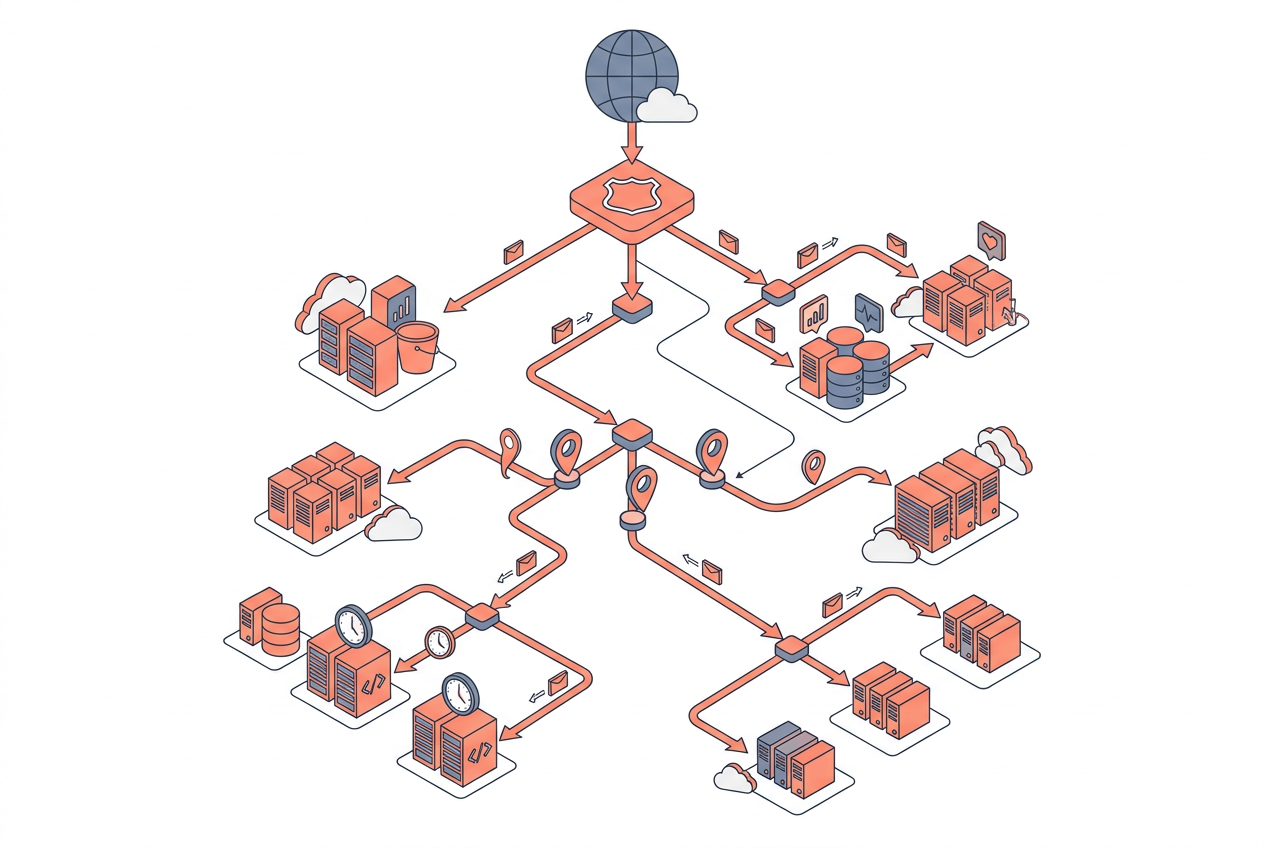
Route 53 is the control plane for both patterns, but the routing policies and health check designs differ significantly.
For active-active, configure latency-based routing records in each region with associated Route 53 health checks pointing to your ALB or CloudFront distribution. Set the health check to evaluate every 10 seconds with a failure threshold of 2–3 consecutive failures. This gives you a detection-plus-DNS-propagation window of roughly 20–30 seconds. Use Route 53 Application Recovery Controller (ARC) routing controls if you need deterministic, operator-controlled failover rather than automatic health-check-driven failover — ARC is particularly valuable for active-active setups where you want to drain a region deliberately.
For active-passive, create a primary failover record and a secondary failover record. Attach a health check only to the primary. When the primary health check fails, Route 53 stops returning the primary record and returns the secondary. Keep your DNS TTL at 60 seconds or lower. Note that Route 53 health checks originate from multiple AWS locations globally; a health check is considered failed only when the majority of checkers agree, which reduces false positives.
A common mistake is setting TTL too high (300+ seconds). During a real outage, clients that cached the old DNS response will continue hitting the failed region for the full TTL duration. Keep TTL at 60 seconds for production failover records.
Data Replication and Consistency Trade-offs
Replication strategy is where most multi-region designs succeed or fail. The CAP theorem is not just academic: in a network partition between two AWS regions, you must choose between consistency and availability.
DynamoDB Global Tables sacrifices strong consistency for availability — reads from a non-primary region may return slightly stale data (eventual consistency). If your application can tolerate this (shopping carts, user preferences, analytics), DynamoDB Global Tables is the operationally simplest choice. If you need strong consistency (financial ledgers, inventory counts), you must route all reads and writes through a single primary region, which effectively makes your data layer active-passive even if your compute layer is active-active.
Aurora Global Database's write forwarding feature lets secondary regions accept writes, but those writes are synchronously forwarded to the primary before being acknowledged. This preserves consistency but adds cross-region round-trip latency (typically 50–200 ms depending on region pair distance). For latency-sensitive write paths, this may be unacceptable.
Amazon S3 Cross-Region Replication replicates objects asynchronously with typical replication times under 15 minutes for most objects, and S3 Replication Time Control (RTC) guarantees 99.99% of objects replicate within 15 minutes with a service-level agreement.
Cost Considerations
Running active-active across two regions roughly doubles your compute and data transfer costs compared to a single-region deployment. Data transfer between AWS regions is billed at standard inter-region rates (approximately $0.02 per GB for most region pairs as of 2026, though rates vary). DynamoDB Global Tables charges for replicated write request units in each replica region — a write that replicates to three regions is billed as three write operations.
Active-passive pilot light can reduce standby costs to 10–20% of full production cost by keeping only essential infrastructure running. Warm standby typically runs at 20–50% of production capacity. Use AWS Cost Explorer and the AWS Pricing Calculator to model your specific workload before committing to a pattern.
Key Takeaways
- Active-active gives you near-zero RTO and RPO but requires multi-master data replication, conflict resolution logic, and roughly double the infrastructure cost.
- Active-passive is simpler and cheaper but accepts minutes of downtime during failover; pilot light is cheapest, warm standby recovers faster.
- Route 53 Latency-Based or Weighted Routing drives active-active traffic distribution; Route 53 Failover Routing drives active-passive cutover.
- DynamoDB Global Tables is the easiest path to active-active multi-master data; Aurora Global Database is better for relational workloads but requires careful handling of write forwarding latency.
- DNS TTL should be 60 seconds or lower for any failover record to minimize the propagation window during an outage.
- Route 53 Application Recovery Controller adds deterministic, operator-controlled failover on top of automatic health checks — valuable for both patterns in production.
- Cost scales with standby tier: pilot light < warm standby < active-active; choose the tier that matches your actual RTO/RPO requirements, not aspirational ones.
Frequently Asked Questions
What is the difference between active-active and active-passive in AWS?
Active-active means all regions serve live traffic simultaneously with no standby, while active-passive keeps one region idle until the primary fails. Active-active offers near-zero RTO but requires multi-master data replication; active-passive is simpler but accepts minutes of recovery time.
Which Route 53 routing policy should I use for multi-region failover?
Use Failover Routing for active-passive setups where you want automatic cutover when a health check fails. Use Latency-Based Routing or Weighted Routing for active-active setups where you want traffic distributed across regions under normal conditions.
Does DynamoDB Global Tables support active-active writes?
Yes. DynamoDB Global Tables is a true multi-master, active-active replication solution that supports writes in every replica region. Conflict resolution uses last-writer-wins based on wall-clock timestamps, so your application must be designed to tolerate this behavior.
How long does Aurora Global Database failover take?
A managed planned failover (used for maintenance or testing) typically completes in under 1 minute. An unplanned failover after a region failure typically completes in under 3 minutes, after which the promoted secondary becomes the new primary.
Is active-active always better than active-passive for disaster recovery on AWS?
Not necessarily. Active-active is better for RTO/RPO but significantly more expensive and operationally complex. If your business can tolerate 5–15 minutes of downtime and your write patterns make conflict resolution difficult, active-passive warm standby is often the more practical and cost-effective choice.
What is Route 53 Application Recovery Controller and when should I use it?
Route 53 ARC provides routing controls and readiness checks that let you manually shift traffic between regions in a controlled, deterministic way. Use it when you need operator-controlled failover rather than (or in addition to) automatic health-check-driven failover — especially useful for large-scale active-active architectures where you want to drain a region before a planned event.
How do I estimate the cost of a multi-region AWS architecture?
Start with the AWS Pricing Calculator to model compute, data transfer, and database replication costs for each region. Add inter-region data transfer costs (approximately $0.02/GB for most pairs), DynamoDB replicated write costs, and Route 53 health check fees ($0.50/month per health check as of 2026). Compare the total against your business cost of downtime to determine which tier is economically justified.
Draw this in seconds with draft1. Describe your architecture in plain English and draft1 generates an editable AWS/cloud diagram plus documentation — no dragging boxes around. Try it free.